
Mod Installation
- Must be loaded manually
- Other players must have it installed
- Everyone starts at rank 1
- Progression and classes are mod specific
Bot Warfare adds smart, fully customizable bots to IW4x for both private matches and dedicated servers.
This guide will walk you through everything you need to install and configure the mod.
You can download the latest version and source code on GitHub.
Big thanks to INeedGames for maintaining this mod! 💖
There are two ways to install the mod. Each one works well for different setups.
Mod Installation
Script Installation
Navigate to your IW4x installation directory
Open the mods folder (create it if needed)
Extract the mp_bots folder from the downloaded .zip archive into the mods folder
Your folder structure should look like this:
Call of Duty: Modern Warfare 2Navigate to your IW4x installation directory
Open the userraw folder (create it if needed)
Extract the scriptdata folder and z_svr_bots.iwd from the downloaded .zip archive into the userraw folder
Your folder structure should look like this:
Call of Duty: Modern Warfare 2If you installed the mod version, load it from the in-game Mods menu.
You’ll know the mod is active when you see Mod: mods/mp_bots in the top-left corner of the main menu:
Set the fs_game dvar to mods/mp_bots when launching the server:
iw4x.exe -dedicated +fs_game mods/mp_botsYou can customize the bot behavior through your server config.
A full list of configurable settings is available in the Bot Warfare README.
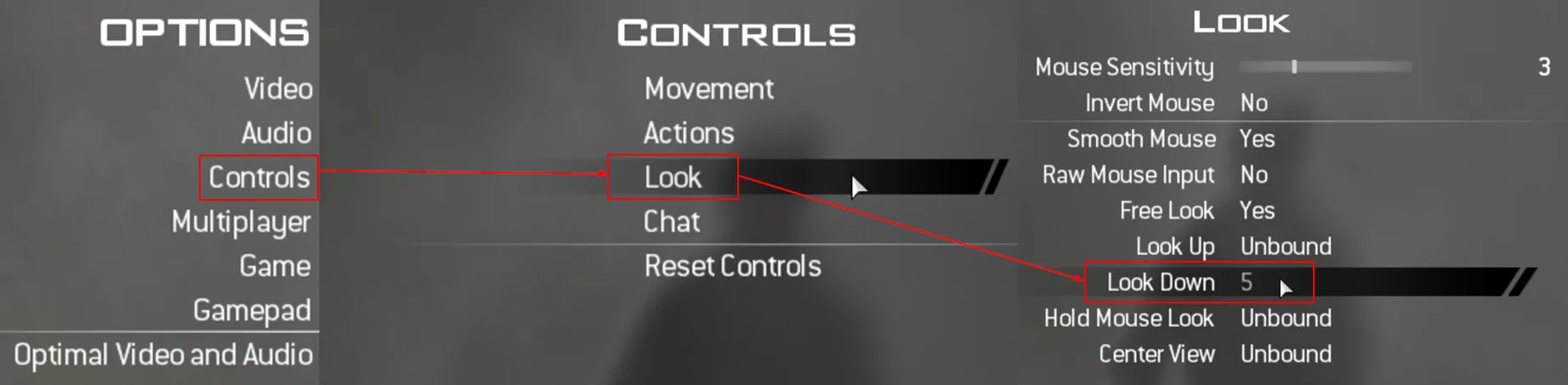
In private matches, press 5 (default key for actionslot 2) to open the Bot Warfare menu.
To change the key:
Go to Options -> Controls -> Look
Change the Look Down keybinding
Open the menu in a private match to spawn bots or tweak the settings.
If you run into any issue while following these guide, we are happy to help you out on our Discord server!
